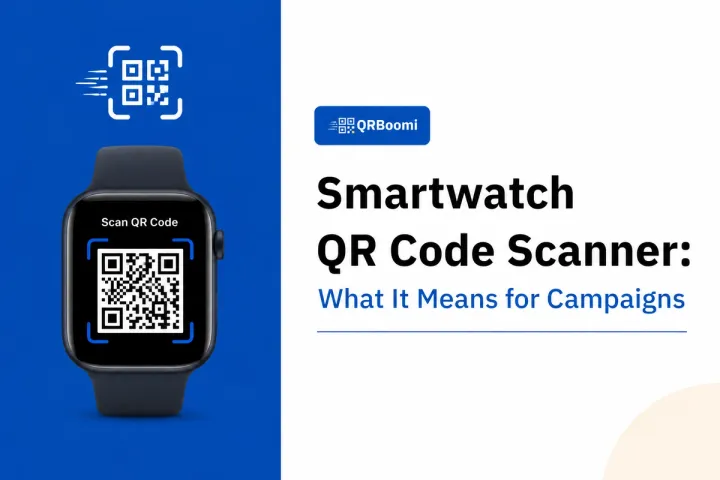
A smartwatch QR code scanner is the capability of a wearable device to read and act on QR codes, either by scanning codes from the environment using the watch's camera, or by displaying a QR code on the watch screen for an external reader to scan. Specifically, for marketers, this means your QR campaign audiences are increasingly scanning and presenting codes from their wrists, not just their phones. Campaigns that account for wrist-based interactions deliver a materially better user experience, and those that use dynamic QR codes can update destinations in real time without reprinting a single asset.
Most QR Campaign Briefs Still Assume a Phone. That Assumption Is Getting Expensive.
Your audience is wearing a device that can interact with your QR campaign. Most marketers are building as though they are not.
Smartwatch adoption has accelerated faster than campaign design teams have adapted. Apple Watch, Samsung Galaxy Watch, and Wear OS devices now make up a growing share of scan interactions at events, retail activations, and loyalty programs. The scan is the same. But the device, the screen size, the user intent, and the landing experience are fundamentally different.
This post breaks down exactly how smartwatch QR scanning works across device platforms, where wrist-based scans show up in campaigns right now, and how to build QR campaigns that account for wearables from the start, not as an afterthought.
The Problem: QR Campaigns Are Built for Phones That Are Not Always the Device Doing the Scanning
Here is what most QR campaign briefs get wrong: they assume the phone is always the scanning device.
When a user at your pop-up event presents a ticket on their Apple Watch, that is a QR code your point-of-sale scanner reads. When a gym member taps their Galaxy Watch at the check-in kiosk, that is a QR code displayed on a wrist screen. When a runner at a sponsored race checks in via their Garmin or Wear OS device, there is a wearable involved somewhere in the scan journey.
The failure is not the QR code. The failure is building campaigns that break the moment a non-phone device enters the picture.
The Real Cost of Ignoring Wearables in QR Campaign Design
When your dynamic QR landing page is not optimised for wrist-triggered navigation, you lose the conversion. When your loyalty QR is static and expires, the wearable user cannot complete the journey. When your event QR code lacks adequate contrast for a small OLED display, the check-in fails. Each of these is a campaign design problem, not a technology problem.
How a Smartwatch QR Code Scanner Actually Works
Understanding the mechanics helps you design campaigns that do not break on wearable devices. There are two distinct modes of smartwatch QR interaction, and they matter differently to marketers.
Mode 1: The Smartwatch Displays a QR Code (Most Common for Campaigns)
This is the dominant use case in marketing contexts today. The user stores a QR code on their watch, and an external scanner, your POS system, event gate, or loyalty kiosk, reads it.
- Apple Watch displays QR codes through Apple Wallet and third-party watchOS apps. Event tickets, loyalty cards, and boarding passes all use this model.
- Samsung Galaxy Watch and Wear OS devices display QR codes through Samsung Pay, Google Wallet, and third-party apps, supporting contactless payments and credential display natively.
- Garmin devices, while fitness-focused, support QR storage via Connect IQ apps, primarily for membership cards, race bibs, and gym access.
For marketers, this means your QR code is not just living in an email or on a shelf card. It is being saved to a wrist and presented back at your physical touchpoint. Your campaign architecture needs to account for that.
Mode 2: The Smartwatch Scans a QR Code (Emerging, Device-Dependent)
Some Wear OS devices with cameras can scan QR codes from the environment using third-party scanning apps. This is less common, more technically variable, and currently limited by camera quality and processing speed on most watch hardware.
The practical implication: do not build a campaign that requires a user to scan with their watch. Design for the phone as the scanning device, and design for the watch as the credential display device.
4 Campaign Scenarios Where Smartwatch QR Scanning Changes Your Strategy
Event Check-In and Ticketing
This is the highest-volume wearable QR scenario in marketing today. Attendees show up with their event ticket on their Apple Watch or Galaxy Watch. Your gate scanner reads it.
The campaign design implication: your QR ticket needs to be dynamic. Static event QR codes cannot be updated if logistics change, access tiers shift, or you want to add a post-event campaign redirect. With dynamic QR, the same code that got them in can redirect to a post-event survey, exclusive content, or your next event registration page the moment the gate closes.
QRBoomi Campaign Insight
Across event QR campaigns on QRBoomi, we have seen dynamic post-event redirects capture up to 3x the follow-up engagement compared to dead-end static tickets. The code stays live. The destination changes. The attendee already scanned. That is a campaign asset you are not using if your QR is static.
Retail Loyalty and Membership Programs
Loyalty programs that issue QR codes are seeing growing wearable adoption. Members save their loyalty QR to Apple Wallet or a Samsung Pay-linked app, and they scan in from the wrist at checkout.
The design implication: your loyalty QR must render cleanly on a small, high-contrast OLED or LTPO display. High-complexity branded QR codes with fine details can scan unreliably on a wrist-sized screen. For wearable-facing loyalty programs, cleaner designs with higher error correction levels scan more reliably.
Dynamic QR codes add a second layer of value here: you can attach campaign variables to a loyalty scan, tracking which product, which location, and which time of day a member engaged, without issuing a new code.
Fitness and Wellness Brand Activations
Fitness brands that run sponsored events, gym partnerships, or wellness campaigns are operating in high-wearable environments. Runners, gym-goers, and class participants are far more likely to have a smartwatch than a phone in hand at the moment of campaign interaction.
If your brand activation QR code requires a phone to scan, you are adding friction in an environment where the dominant device is a wrist-worn computer. Design your on-site campaign touchpoints for wearable credential display, and ensure your QR check-in kiosks can read codes from a watch screen at varying brightness levels.
D2C Packaging With Loyalty or Reorder QR Codes
When a D2C brand embeds a QR code on packaging for a reorder or loyalty campaign, and a customer saves that code to their watch wallet, the unboxing experience extends to the wrist. That is a first-party data touchpoint most brands are not tracking.
With dynamic QR campaigns, that packaging code is not locked to a single destination. It can redirect to a seasonal campaign, a loyalty sign-up, a referral program, or a limited-time offer, without reprinting a single box.
What a Wearable-Ready QR Campaign Looks Like in Practice
Designing for smartwatch QR interactions does not require a separate campaign architecture. It requires three intentional decisions layered into your existing QR campaign process.
- Use dynamic QR codes. Every time. The moment a code is saved to a wallet or wearable app, you have lost control of the destination if your code is static. Dynamic codes keep the campaign live.
- Build mobile-first landing pages that load fast and require minimal input. Wrist-triggered navigation means the user is on a small screen, likely moving, and not willing to complete a ten-field form. Your QR campaign destination should load in under two seconds and ask for one action.
- Track scan device data. QRBoomi's campaign analytics capture device type and context on every scan. When you see a spike in wearable-adjacent scan patterns, for example short session durations on mobile with high credential display rates at a single location, that is wearable engagement telling you something about your campaign performance.
- Design QR codes for multi-surface readability. High-contrast, clean QR designs with adequate quiet zones scan reliably on both phone cameras and wearable-display kiosk readers. Overly complex or fine-detailed branded codes can fail on small OLED screens at reduced brightness.
The QRBoomi Wearable-Aware Campaign Checklist 1. Is this code dynamic? Can the destination be updated after print or wallet storage? 2. Does the landing page load in under 2 seconds on a 4G mobile connection?3. Is the QR design clean enough to scan from a 40-45mm watch display? 4. Is scan device data being captured in campaign analytics? 5. Does the post-scan experience require only one action from the user?
Key Takeaways
- A smartwatch QR code scanner functions primarily as a credential display device in marketing contexts. The watch shows your QR code. External readers scan it. Design for this, not for the watch to do the scanning.
- Event ticketing, retail loyalty, fitness activations, and D2C packaging are the four campaign scenarios where wearable QR interactions are already happening at scale.
- Static QR codes break the wearable campaign journey. Once a code is saved to a wallet app on a smartwatch, you cannot update its destination. Dynamic codes solve this.
- Mobile-first landing page design is not optional for wearable-adjacent campaigns. Short session durations, single-action flows, and fast load times are non-negotiable.
- Campaign analytics that capture device and location data give you visibility into wearable scan patterns. Use them.
QR code design quality matters more across surfaces. Clean, high-contrast codes with standard error correction scan reliably from both phones and wearable-facing kiosk readers.

The QRBoomi Perspective
Wearable QR interaction is not a future trend. It is happening at every event gate, gym check-in, and coffee shop loyalty counter where a QR campaign is running. The brands that are not capturing that engagement are the ones still treating QR codes as one-off static assets. A dynamic QR campaign on QRBoomi stays live after the first scan, tracks every interaction regardless of device, and lets you update the destination without touching the code. That is the infrastructure for a wearable-ready campaign. The code on someone's wrist is not the end of the journey. With dynamic QR, it is the start of the next one.
Frequently Asked Questions
Some Wear OS smartwatches with cameras can scan QR codes using third-party apps. However, native camera-based QR scanning is not standard across all smartwatch platforms. Apple Watch does not include a built-in external QR scanner. For campaign design purposes, assume the watch displays a QR code and an external reader scans it, not the reverse.
Yes. Apple Watch displays QR codes stored in Apple Wallet and through third-party watchOS apps. Event tickets, loyalty cards, boarding passes, and membership credentials are commonly stored and displayed this way. For marketers, this means QR codes issued through Wallet-compatible campaigns are accessible from the wrist without the user opening their phone.
A static QR code locks its destination at creation. Once a user saves it to a smartwatch wallet app, you cannot change where it leads. A dynamic QR code allows you to update the destination URL, campaign content, or redirect after deployment. For wearable campaigns, dynamic codes are essential because the code lives on the device between campaign cycles.
QRBoomi campaign analytics capture device type, scan location, time, and session data for every interaction. While smartwatch operating systems report scans through the paired phone's browser in most cases, scan analytics can reveal wearable interaction patterns through session duration, bounce rate at credential-display touchpoints, and geographic clustering near physical activation sites.
Yes, with one key adjustment. Clean, high-contrast QR codes with adequate quiet zones scan more reliably from a small OLED or LTPO watch display when presented to an external reader. Overly complex branded codes with fine details or low-contrast colour choices can fail at reduced brightness settings on wearable screens. Simpler designs with strong error correction scan consistently across surfaces.
Apple Watch supports QR codes through Apple Wallet and third-party watchOS apps. Samsung Galaxy Watch supports QR display via Samsung Pay and Google Wallet on Wear OS. Garmin devices support QR storage through the Connect IQ app ecosystem. Support varies by model, region, and app availability, but the three major platforms all have QR-capable pathways for loyalty and payment use cases.
Event ticketing and loyalty program check-in are the highest-volume use cases. Both involve the user storing a campaign-issued QR code in their watch wallet and presenting it at a physical reader. Fitness activations, transport credentials, and D2C packaging reorder journeys are growing applications as wearable adoption increases across consumer demographics.