Most HR teams have a QR code problem. Not a shortage of them — a shortage of results.
They print a code on an onboarding packet, stick one on a job fair banner, or add one to a welcome email. Then nothing. No data. No follow-up. No idea if anyone actually scanned it. That is not a QR campaign. That is a QR code shaped like a dead end.
The HR teams driving measurable engagement — faster onboarding completion, higher job fair lead capture, real-time feedback data — treat every QR code as a campaign, not a decoration. This post shows you exactly how.
What are QR codes for HR?
QR codes for HR are dynamic, trackable campaign assets deployed across the employee lifecycle — from recruitment and onboarding to training and exit processes. Specifically, unlike static codes that link to a single fixed destination, HR QR campaigns use dynamic codes that can be updated, A/B tested, and tracked in real time, giving HR teams scan-to-outcome data across every physical and digital touchpoint.
Why HR Needs QR Campaigns, Not Just QR Codes
Here is what most HR teams get wrong about QR codes: they treat them as access points, not campaign assets.
A static QR code on a job fair flyer links to your careers page. Fine. But what happens after the scan? Who scanned it? From which city? On which device? Did they apply? Did they drop off after three seconds? You have no idea.
HR is a function drowning in decisions that need data. Employee satisfaction. Onboarding drop-off. Training completion rates. Benefits uptake. Every one of those decisions can be informed by scan behavior — but only if HR teams build campaigns, not codes.
The QRBoomi Scan-to-Outcome Framework for HR
Objective (what action should this scan drive?) > Campaign Design (branded code, destination, CTA) > Distribution (where is the code placed, physical or digital?) > Tracking (scan volume, location, device, time) > Outcome (form completion, video watched, policy acknowledged, feedback submitted)
When HR teams build QR codes through this framework, every scan becomes a data point. Every touchpoint becomes measurable. And every campaign can be updated without reprinting a single asset.

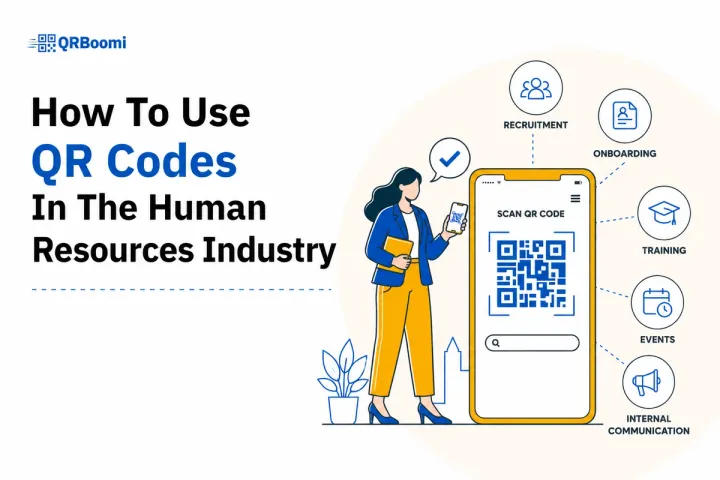
7 High-Impact Use Cases for QR Codes in HR
1. Recruitment and Job Fair Lead Capture
Job fairs are expensive. Most brands walk away with a pile of business cards and no follow-up system. A QR code campaign on your booth banner, branded giveaways, or printed flyers changes that completely.
Link the code to a mobile-optimized landing page with a short lead capture form — name, email, role of interest. Because the code is dynamic, you can update the destination landing page for each event without reprinting materials. You capture first-party candidate data instantly, and QRBoomi tracks scan volume, location, and device type so you know which events actually drive pipeline.
- Outcome to track: Lead form submissions per event, cost-per-lead from physical presence vs digital channels.
2. Employee Onboarding Completion
Onboarding packets are where engagement goes to die. Dense PDFs. Long URLs. Required acknowledgments buried on page 14.
QR codes in printed onboarding kits — or on welcome desk cards, ID badge holders, even office signage — link new hires directly to onboarding portals, video walkthroughs, policy acknowledgment forms, or digital handbooks. Each scan is tracked. HR managers can see which new hires engaged with which materials and on what day.
Across QRBoomi users in the HR space, onboarding task completion rates increase significantly when QR codes replace manual URL navigation on mobile devices.
- Outcome to track: Onboarding material open rate, acknowledgment form completion rate, time-to-completion per task.
3. Employee Feedback and Pulse Surveys
Anonymous feedback campaigns fail when participation is low. Participation is low when friction is high.
QR codes placed in common areas — break rooms, bulletin boards, meeting room walls, even on desk tent cards — give employees a frictionless path to a feedback form or pulse survey. No login. No email link hunting. One scan.
Dynamic codes mean you can rotate the destination survey monthly without touching the physical asset. Every scan is timestamped and location-stamped, so HR can identify which departments or office locations are participating and which are not.
- Outcome to track: Survey completion rate by location, anonymous response volume over time, participation trends by department.
4. Benefits Enrollment and Open Enrollment Campaigns
Benefits enrollment windows are short. The information is complex. And most employees do nothing until the deadline.
A QR campaign on printed benefits guides, desk inserts, or posted breakroom notices can drive employees directly to enrollment portals, benefits comparison pages, or explainer video sequences. Because QRBoomi codes are dynamic, HR can update the destination as enrollment windows open and close, always pointing employees to the right place at the right time.
Outcome to track: Click-through rate to enrollment portal, scan-to-enrollment conversion rate, peak scan time (useful for deadline push campaigns).
5. Training and Compliance Course Delivery
Mandatory training is one of HR's most persistent completion challenges. Employees forget. Managers chase. Deadlines pass.
QR codes on printed training schedules, compliance posters, or desk reminder cards can link directly to specific training modules, course login pages, or completion confirmation forms. Placed in physical environments where employees already are — workstations, lunchrooms, factory floors — they turn passive space into active campaign touchpoints.
- Outcome to track: Training module access rate from QR vs email, course completion rate, compliance deadline achievement.
6. Internal Communications and Policy Acknowledgment
Policy updates get buried in email. Annual handbook revisions generate acknowledgment rates that would embarrass a marketer.
QR codes on printed policy updates, internal newsletters, or office communication boards link directly to the specific document, video summary, or acknowledgment form. HR teams can track who scanned, when, and whether they completed the required action. Update without reprinting. Track without chasing.
- Outcome to track: Policy acknowledgment completion rate, scan-to-action rate, document access by department.
7. Exit Interviews and Offboarding
Exit interview completion rates are notoriously low. Departing employees are distracted and the process often feels like an afterthought.
A QR code on offboarding paperwork or a farewell card links directly to a structured exit survey. It signals care. It is frictionless. And it collects data that HR teams can analyze to identify retention patterns and systemic issues. Because the destination is dynamic, HR can update the survey form without touching the physical asset.
Outcome to track: Exit interview completion rate, qualitative theme frequency, completion-by-department to identify where retention risk is highest.
The QRBoomi HR Campaign Framework
Not every HR use case requires the same campaign setup. Here is how to match your QR campaign configuration to your HR objective:
| HR Objective | QR Code Destination | Key Metric |
|---|---|---|
| Recruit talent at events | Mobile lead capture landing page | Form submission rate |
| Onboarding completion | Onboarding portal or task checklist | Task completion rate |
| Employee feedback | Pulse survey or anonymous form | Survey response rate |
| Benefits enrollment | Enrollment portal or comparison page | Scan-to-enrollment rate |
| Training compliance | Specific course or LMS login | Module access and completion rate |
| Policy acknowledgment | Document + acknowledgment form | Sign-off completion rate |
| Exit interviews | Structured exit survey | Exit interview completion rate |
Every campaign in this table is built on dynamic QR codes. That means every destination can be updated post-deployment. Every scan is tracked. And every result feeds a dashboard HR teams can report on.
Key Metrics HR Teams Should Track
Most HR QR deployments stop at scan count. Scan count is not a campaign metric. It is a vanity metric.
The metrics that matter are scan-to-outcome rates — the conversion from scan to the action HR actually cares about. Here is the measurement hierarchy QRBoomi recommends for HR campaigns:
| Metric | Why It Matters |
|---|---|
| Scan-to-action rate | What percentage of people who scanned completed the desired action? This is your campaign conversion rate. |
| Scan location data | Which office, floor, or event generated the most scans? Location data reveals where physical campaigns are working. |
| Device type | Mobile-vs-desktop split confirms your landing page is optimized for the right experience (93%+ of HR QR scans happen on mobile). |
| Scan time distribution | Peak scan windows tell you when campaigns land hardest — useful for planning deadline reminder campaigns. |
| Drop-off point analysis | Where did people scan but not complete the action? This tells you whether the destination page, not the code, is the problem. |
With QRBoomi's campaign analytics, HR teams can pull all five data layers from a single dashboard and attribute outcomes to specific physical touchpoints for the first time.
Common HR QR Campaign Mistakes
Most QR codes fail in HR not because of the technology but because of the campaign design. Here are the four mistakes we see most often:
- Static codes that can't be updated. When the landing page changes, the campaign is dead. Dynamic codes eliminate this entirely.
- Sending scans to a generic homepage. Every QR code should land on a purpose-built, mobile-optimized page specific to that campaign objective. Generic destinations kill conversion.
- No tracking set up before launch. If you don't configure scan tracking before you print the codes, you lose all data from day one. Set up the campaign before the asset goes to print.
- Unbranded, unstyled codes. White squares with no logo or brand context generate lower scan rates. Branded QR design with employer brand colors and a logo center increases trust and scan-through rate.
No CTA around the code. A QR code without instruction is a puzzle. Always add a short action phrase: 'Scan to complete your onboarding checklist.' Scan rates improve meaningfully with a clear CTA.
Key Takeaways
- QR codes in HR should be campaign assets, not access shortcuts. Every scan should be tracked and connected to an outcome.
- Dynamic QR codes let HR teams update destinations post-deployment, so your physical materials stay current without reprinting.
- The 7 highest-impact HR use cases are: recruitment, onboarding, feedback, benefits enrollment, training compliance, policy acknowledgment, and exit interviews.
- Scan-to-action rate — not scan count — is the metric that tells you whether a campaign is performing.
- Branded, mobile-optimized QR campaigns with clear CTAs outperform generic static codes across every HR touchpoint.
- QRBoomi's campaign analytics give HR teams location, device, time, and conversion data from a single dashboard.
The QRBoomi POV
HR teams are sitting on one of the most underutilized physical-to-digital conversion opportunities in any organization. Every printed touchpoint in the employee lifecycle — from the job fair banner to the offboarding packet — is a campaign asset waiting to be activated. The brands and HR functions that recognize this are collecting first-party data, driving measurable engagement, and building employee experiences that are tracked and optimized. The ones still using static codes are printing expensive dead ends.
Every scan is a data point. Every physical HR touchpoint is a campaign. Build it that way.
Frequently Asked Questions
Dynamic QR codes for HR are editable campaign assets that let you change the destination URL, survey, or landing page after the code has been printed or deployed. Unlike static codes that lock in a single destination, dynamic HR codes update without reprinting, track every scan, and let you run multiple campaigns from the same physical asset.
HR teams using QRBoomi track scan volume, scan location, device type, scan time, and scan-to-action conversion rates from a single analytics dashboard. This allows HR managers to see which physical touchpoints are driving onboarding completions, feedback submissions, or training enrollments and which are being ignored.
Yes. QR codes placed on printed onboarding kits, welcome desk cards, ID badge holders, or office signage can link new hires directly to onboarding portals, video walkthroughs, policy forms, and checklists. Dynamic codes track completion and can be updated as onboarding content changes without reprinting any materials.
A QR code on a job fair banner should link to a mobile-optimized lead capture landing page specific to that event, not a generic careers page. The page should include a short form, a clear CTA, and the employer brand. QRBoomi tracks scan volume, location, and conversion rate so recruiters can measure ROI per event.
Use branded QR designs with employer brand colors and logo. Always add a short, clear CTA next to the code ('Scan to complete your onboarding' or 'Scan to share feedback'). Place codes at eye level in high-traffic locations. Use mobile-optimized landing pages as destinations. Unbranded, unexplained codes on generic pages see the lowest scan-to-action rates.
Yes. With dynamic QR codes from QRBoomi, the printed code stays the same while the destination URL changes. This means a single code on an office poster can serve as a feedback campaign today, a training reminder next month, and a benefits enrollment link during open enrollment season, all without reprinting the poster.
Anonymous feedback campaigns placed in high-traffic physical spaces — breakrooms, corridors, meeting rooms — consistently produce strong participation rates when the destination is a short, mobile-optimized pulse survey. The frictionless scan experience removes the login and email barriers that kill engagement survey participation rates.