Your restaurant's QR code is not the problem. The page it opens is. Most restaurants spend weeks picking a QR code design and five minutes deciding what it links to. That five minute decision is where the order gets placed, the review gets written, or the guest gives up and asks a server for a paper menu instead.
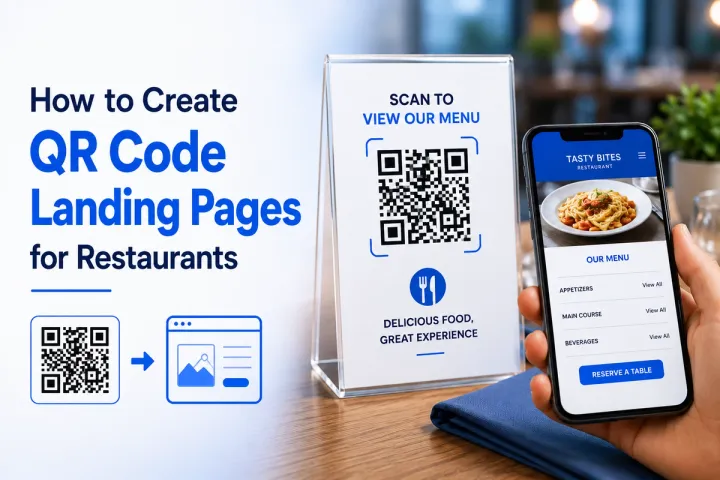
A QR code landing page for restaurants is not a PDF. It is the fastest path between a hungry guest and the action you want them to take, and this guide shows you how to build one that actually converts.
Why Most Restaurant QR Codes Underperform
Three out of four restaurants worldwide now use QR codes for digital menus, according to a 2026 industry roundup from Supercode covering more than 850 establishments. Adoption is not the issue.
The issue is what the code opens. A large share of those codes link straight to a PDF: the same file the restaurant used to print, just uploaded to a server. Guests pinch, zoom, and scroll through a document that was designed for paper, not for a five-inch screen held in one hand.
This matters because guest behavior has already shifted. Industry research from eMarketer-backed surveys puts consumer preference for scanning a QR code over downloading an app at 72%, and separate 2026 data from TableQR links QR-enabled ordering to a 15% increase in table turnover when the destination page is built for ordering, not just viewing.
A generic PDF or homepage cannot capture either of those gains. A landing page, purpose-built for the scan, can.
The QRBoomi Scan-to-Table Framework
We built the Scan-to-Table Framework from patterns observed across restaurant campaigns run on QRBoomi. It breaks the guest journey into four stages, and each stage maps to a specific decision you need to make when you design the landing page.
- Scan: The trigger. A table tent, menu insert, receipt, or window sticker with a dynamic QR code that can be updated without reprinting.
- Serve: The first five seconds on the page. The menu, special, or offer that matches exactly where the code was placed, not a general homepage.
- Convert: One clear action: place an order, call a server, leave a review, or join a loyalty program. Not five actions competing for the same thumb.
- Retain: A way to keep the guest connected after the visit, such as a loyalty signup or a WhatsApp opt-in, so the next scan is not the only touchpoint you get.
Skip the Retain stage and every scan is a one-time interaction. Build for it, and each landing page becomes a small, ongoing campaign asset.
What Belongs on a Restaurant QR Landing Page
A strong restaurant landing page is short, scannable, and built around one job. These are the components that consistently earn their place.
- Digital menu, grouped by category: starters, mains, drinks, desserts, with photos only where they help a decision, not for decoration.
- Today's specials or a live promotion: placed above the full menu so it is the first thing a guest sees.
- One primary call to action: order now, call a server, or book the next table, matched to how that specific code will be used.
- Dietary and allergen filters: vegetarian, vegan, gluten-free tags a guest can tap instead of asking staff to read the whole menu aloud.
- A review link: placed after the meal, on the receipt or table tent, not competing with the menu code.
- WiFi details: on the same page if the guest is likely to sit for a while, so they are not hunting for a second code.
- A loyalty or newsletter signup: one field, not a form. Ask for an email or phone number, nothing more.
- A language toggle: essential in tourist-heavy locations. Supercode's 2026 data shows QR menu adoption near 82% in cities like Paris, Barcelona, and Tokyo, largely because a language selector removes the biggest barrier for visiting guests.
Step-by-Step: Building the Landing Page in QRBoomi
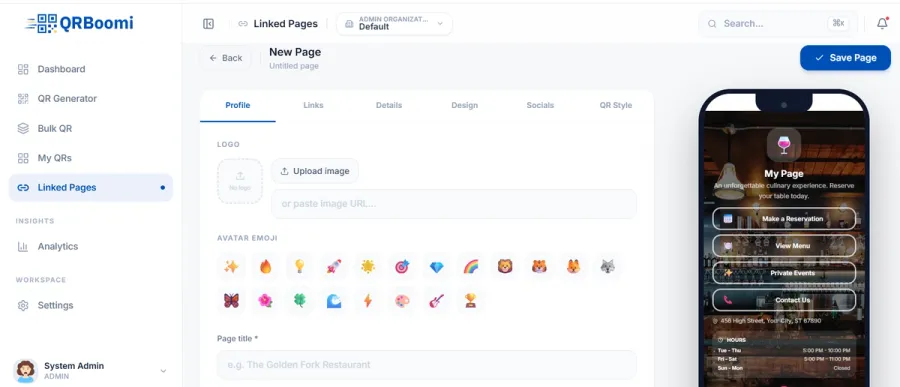
- Start from a restaurant landing page template. QRBoomi's landing page builder includes menu-ready layouts, so you are editing content, not building a page from a blank screen.
- Structure the menu by category first. Add sections before individual items, then drop in dishes with pricing, tags, and photos where useful.
- Set your one primary action. Decide whether this specific placement is for ordering, reviews, or bookings, and make that button the most visible element on the page.
- Connect a dynamic QR code. Generate the code from your dynamic QR codes feature so the destination can change without a reprint when the menu or promotion updates.
- Turn on scan analytics. Enable tracking so every scan records device, location, and time of day from day one, not after you notice a problem.
- Test on an actual phone before printing. Load speed and thumb reach matter more on a real device than they do on a desktop preview.
- Print, place, and iterate. Put the code on tables, menus, or receipts, then use scan data to adjust the page without touching the printed material again.
Design Rules That Actually Increase Conversions
Restaurant landing pages fail for design reasons more often than content reasons. These rules hold up across QRBoomi campaigns.
- Design mobile-first. Nearly every scan happens on a phone, so there is no reason to build for desktop and adapt down.
- Put the primary action above the fold. If a guest has to scroll to find the order button, most will not.
- Use large, thumb-friendly tap targets. Guests are often holding a menu, a drink, or a child in the other hand.
- Keep load time under two seconds. Restaurant WiFi is inconsistent, and a slow page loses guests before they see the menu.
- Never put the menu behind a login wall. Save account creation for loyalty signup, after the guest has already engaged.
- Limit each screen to one idea. A crowded landing page recreates the exact PDF problem you were trying to solve.
Click here : To know about how QR Landing pages improve Customer Experience
Different Touchpoints Need Different Landing Pages
The biggest mistake we see is one QR code, and one landing page, covering every use case in the restaurant. A menu QR, a feedback QR, and a happy hour promotion QR are not the same job, and treating them as one page dilutes all three.
- Table menu QR: full menu, categories, specials, and an ordering or call-server action.
- Receipt feedback QR: a short review or ratings page, nothing else competing for attention.
- Loyalty or WiFi QR: a single signup form, placed where guests are likely to be seated for a while.
- Happy hour or event QR: a time-bound offer page, swapped out through a dynamic code once the promotion ends.
QRBoomi's bulk creation tools make this practical at scale: generate and manage a distinct code and landing page for every table, section, or location from one dashboard, instead of manually building each one.
Tracking Scan-to-Order Performance, Not Just Scan Counts
A scan count alone tells you almost nothing about whether the page is working. What matters is which touchpoints, dayparts, and devices actually drive orders, reviews, or signups.
Across restaurant campaigns on QRBoomi, lunch menu QR codes consistently scan at different rates than dinner codes at the same location. That pattern only becomes visible with time-of-day analytics, and it directly informs when to push a lunch special versus a dinner promotion.
Full scan-to-outcome tracking, covering device, location, and time, turns a landing page from a static asset into a source of ongoing campaign decisions.
Key Takeaways
- A QR code landing page for restaurants is a purpose-built mobile page, not a PDF or homepage redirect.
- The QRBoomi Scan-to-Table Framework breaks the journey into Scan, Serve, Convert, and Retain.
- Strong pages include a categorized menu, one clear call to action, dietary filters, a review link, and a loyalty signup.
- Dynamic QR codes let you update the menu or promotion without reprinting a single table tent.
- Different touchpoints, menu, feedback, loyalty, promotions, perform better with separate landing pages instead of one generic page.
- Scan-to-outcome analytics, not raw scan counts, show which placements and times actually drive results.
The QRBoomi POV
A QR code is not a menu strategy. It is a delivery mechanism, and what it delivers is what determines whether a guest orders, reviews, or walks away confused. We believe every table, receipt, and window sticker in a restaurant deserves a landing page built for that exact moment, not a static file repurposed from print. Restaurants that treat each code as its own small campaign, tracked and editable, consistently get more out of the same scan volume than restaurants that treat QR as a one-time setup task.
Frequently Asked Questions
A QR code landing page for a restaurant is the mobile page a guest reaches after scanning a code on a table, menu, or window sticker. It typically shows the digital menu, specials, ordering options, or review links, built specifically for that one scan moment rather than repurposing a general website page.
No. Platforms like QRBoomi include a built-in landing page builder, so you can create a mobile-optimized page without a developer or an existing website. You design the page, connect it to a dynamic QR code, and publish it directly from the platform.
A PDF forces guests to pinch, zoom, and scroll through a document designed for print. A QR landing page is built for mobile screens, loads faster, supports category navigation and filters, and can include ordering, review, and loyalty actions a static PDF cannot.
Yes, if the QR code is dynamic. A dynamic QR code lets you edit the destination page, swap the seasonal menu, or change a promotion without reprinting a single table tent or sticker. Static codes lock you into whatever page you linked at print time.
Strong pages include today's specials, one clear primary action such as ordering or calling a server, a review link, WiFi details, and a loyalty signup. Tourist-heavy locations also benefit from a language toggle so international guests are not stuck translating manually.
Use a platform with built-in scan analytics, such as QRBoomi, to see scan volume by table, device, and time of day. This shows which touchpoints and dayparts drive the most engagement, so you can shift promotions to when guests are actually scanning.