Your QR code just did its job. The scan worked. The camera opened the link without a hitch. Then the page behind it took four seconds to load, forced a pinch-zoom, and buried the offer under three paragraphs nobody asked to read. The scan was never the problem. The landing page was.
If you want scans to become conversions, the page has to earn that outcome in the first two seconds, on a screen the size of your palm. This post breaks down what a mobile-friendly QR landing page actually requires not as a design checklist, but as a system you can apply to any campaign.
Quick answer: A mobile-friendly QR landing page is a single-purpose web page built to load fast, display cleanly, and drive one action on a smartphone screen, since that's where nearly all QR scans happen. Specifically, that means a single-column layout, a load time under three seconds, thumb-reachable buttons, and a call to action visible without scrolling all working together to turn a scan into a measurable outcome, not just a visit.
Why a QR Landing Page Isn't a Regular Web Page
A visitor who lands on your homepage from Google arrived with intent, patience, and probably a laptop. A visitor who scans a QR code arrived from a flyer, a menu, a shelf tag, or an event badge, on a phone, mid-task, with close to zero patience for a page that isn't instantly obvious.
That difference in context changes the design brief entirely. A QR landing page has one job: confirm the visitor is in the right place and get them to the next action before they lose interest. Every extra second, every extra tap, every line of copy that isn't necessary works against that.
According to industry benchmarks cited by mobile UX researchers, roughly 53% of mobile visitors abandon a page that takes longer than three seconds to load. On a QR scan, where the visitor is often standing in a store aisle or waiting in a line, that tolerance is shorter still.
The QRBoomi Scan-to-Screen Framework
We built the Scan-to-Screen Framework after watching the same pattern repeat across campaign types: teams optimize the QR code the branding, the placement, the print quality and then link it to a page that was never built for the moment it's actually used in.
The framework breaks mobile QR landing page design into four layers. Each layer maps to a specific point where scans either convert or drop off.
Layer 1: Load The page has to survive the first three seconds
Speed is the first filter. If the page hasn't rendered something useful within three seconds on a mid-range mobile connection, most visitors are already gone before they've read a word.
Compress every image before upload hero images are the most common cause of slow QR landing pages
- Avoid autoplay video above the fold it's the single biggest mobile load-time cost we see across campaign pages
- Limit the page to one primary font family loaded from a fast CDN, or use system fonts
- Keep the page to a single scrollable view where possible; multi-page flows add load events and drop-off points
Layer 2: Layout Structure for a thumb, not a mouse
Mobile screens are read vertically, scrolled with a thumb, and viewed one section at a time. Layout decisions that work on desktop sidebars, multi-column grids, hover states don't translate.
- Single-column, vertically stacked layout with the value proposition above the fold
- Primary call-to-action button at least 44–48 pixels tall, placed inside the natural thumb zone
- Generous spacing between tappable elements to prevent mis-taps on the wrong link
No horizontal scrolling and no wide tables they force zooming, which is where visitors leave.
Layer 3: Legibility Readable without zooming, in any light
A QR code is frequently scanned outdoors, under fluorescent store lighting, or on a screen with reduced brightness to save battery. Legibility has to hold up under those conditions, not just in a design mockup.
- Body text at 16px minimum; smaller forces zoom, which breaks the single-scan flow
- Strong contrast between text and background don't rely on light gray on white for anything important
- Short paragraphs, three sentences maximum, with clear visual hierarchy between headline, subhead, and body
Descriptive alt text on every image, both for accessibility and for pages that load slowly on weak signal
Layer 4: Signal Build the page so the scan is trackable
This is the layer static QR tools skip entirely, because a static code and a generic page can't report back. If the destination URL is fixed and the page has no tracking layer, every design decision above is a guess you can't verify.
- Route the QR code through a dynamic URL so the destination page can be updated without reprinting the code
- Track scans by device, location, and time of day to see which layout and copy variant actually converts
- A/B test the call-to-action wording and button placement using the same dynamic code, rather than issuing a second code
- Treat scan-to-conversion rate, not scan count alone, as the metric that tells you whether the design is working
QRBoomi campaign insight
Every scan is a data point, but only if the page it lands on is built to close the loop. Campaigns that pair a mobile-optimized landing page with a dynamic QR code give teams the ability to swap headlines, offers, or destinations after the code is already in print something a static code physically cannot do. We recommend tracking scan-to-conversion by device type in the first week of any new campaign, since mobile behavior on that first cohort typically sets the pattern for the rest of the run.
Mobile QR Landing Page Design Checklist
Run any page against this list before the QR code goes to print.
| Design Element | Standard to Hit |
|---|---|
| Load time | Under 3 seconds on a mobile connection |
| Layout | Single column, value proposition above the fold |
| CTA button | 44–48px minimum height, inside the thumb zone |
| Body text | 16px minimum, high contrast |
| Paragraph length | 3 sentences maximum |
| Images | Compressed, with descriptive alt text |
| Forms | One field visible at a time where possible |
| Tracking | Dynamic QR code with scan-level analytics |
QRBoomi Landing Pages vs. Regular Web Pages: What Actually Changes
| Dimension | Regular Web Page | QR Landing Page |
|---|---|---|
| Visitor intent | Researching, comparing | Acting on an immediate prompt |
| Device | Mixed desktop and mobile | Almost entirely mobile |
| Patience for load time | Moderate | Very low, often under 3 seconds |
| Content depth | Can support long-form | One offer, one action |
| Update path | Edit and redeploy the page | Update via dynamic QR without reprinting |
Mobile QR Landing Page Mistakes That Quietly Kill Conversion
Most underperforming QR campaigns aren't failing because the code doesn't scan. They're failing for one of these reasons:
- Linking to the homepage instead of a dedicated landing page the visitor lands with no context and has to hunt for relevance.
- Auto-playing video or heavy carousels that stall load time on mobile networks.
- Asking for too much information in a form before showing any value in return.
- Using a static QR code, which means any typo, broken link, or seasonal update requires reprinting every code in the field.
- No tracking at all, so the team has no idea whether low conversion is a code placement problem or a page problem.
How to Test a QR Landing Page Before It Goes on Print
Once the page is built, don't rely on a desktop preview. Print placement matters as much as the page itself.
- Scan the code with at least two different phone models under normal lighting conditions
- Test on a throttled mobile connection to see real load time, not office WiFi speed
- Check the page at the actual print size the code will appear at a code on a table tent behaves differently than one on a billboard
- Confirm the CTA is visible without scrolling on a standard mobile viewport before launch
How to Design a Mobile-Friendly QR Landing Page with QRBoomi
Creating a mobile-friendly QR landing page doesn't require coding or design experience. With QRBoomi's Linked Pages feature, you can build a professional landing page in just a few steps.
Step 1: Create a New Linked Page
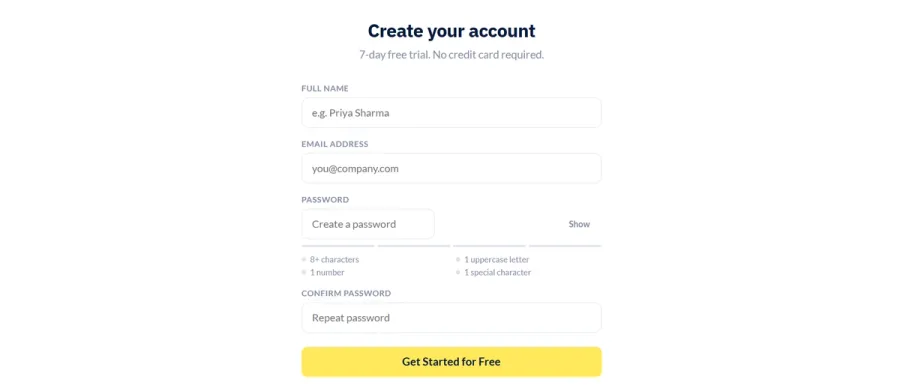
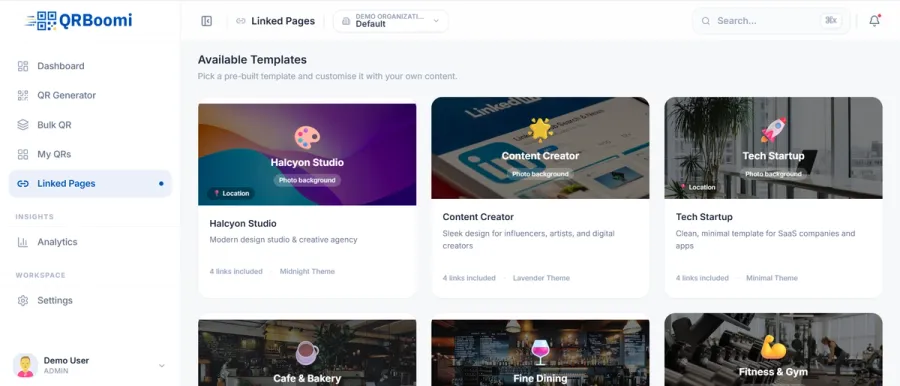
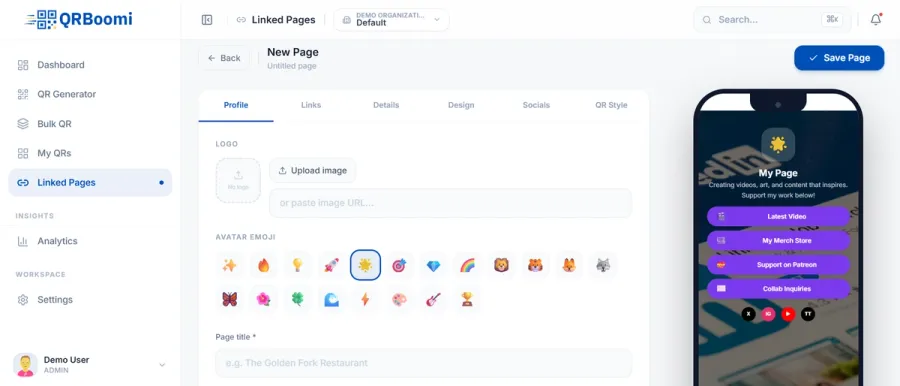
signup to app.qrboomi.com and navigate to Linked Pages from the left sidebar and choose a template that best matches your business or campaign. QRBoomi offers pre-built templates for creators, startups, agencies, restaurants, and more, helping you get started quickly.
Pro Tip: Select a template that aligns with your brand to reduce customization time.
Step 2: Build Your Brand Identity
Under the Profile tab, personalize your landing page by adding:
- Your company logo
- An avatar icon or emoji
- A clear page title
- A short description explaining your business or campaign
For example:
Page Title: QRBoomi
Description: Generate, manage, and track dynamic QR codes for marketing campaigns.
Your title and description should immediately tell visitors what your page is about after they scan the QR code.
Step 3: Add Your Most Important Links
Switch to the Links tab to add the destinations you want users to visit.
Some commonly used links include:
- Website
- Product Demo
- Pricing Page
- Contact Us
- Book a Meeting
- Download Brochure
- Blog
- Customer Support
Arrange the links based on priority, placing the most important action at the top so users can access it without scrolling.
Step 4: Add Additional Business Information
Open the Details tab to include information that builds trust and provides context, such as:
- Business name
- Contact details
- Address
- Business hours
- Short company overview
Keeping this information concise ensures your page remains easy to browse on mobile devices.
Step 5: Customize the Design
In the Design tab, tailor the landing page to reflect your brand by customizing:
- Background image
- Theme colors
- Fonts
- Button styles
- Overall layout
Choose colors with good contrast and ensure text remains readable on small screens. A clean design improves usability and encourages visitors to interact with your content.
Step 6: Connect Your Social Media Profiles
Use the Socials tab to add links to your social platforms, allowing visitors to connect with your brand beyond the landing page.
Popular platforms include:
- X (Twitter)
- YouTube
- TikTok
- GitHub
Only include the platforms that are actively maintained to provide a consistent user experience.
Step 7: Personalize Your QR Code
Navigate to the QR Style tab to customize the appearance of your QR code.
You can personalize elements such as:
- QR colors
- Patterns
- Corner shapes
- Frames
- Branding
A branded QR code is more visually appealing while remaining easy to scan.
Step 8: Preview and Publish
As you make changes, QRBoomi provides a live mobile preview so you can see exactly how your landing page will appear on a smartphone.
Before clicking Save Page, verify that:
- All links are working correctly.
- Buttons are easy to tap.
- Images load properly.
- Text is readable without zooming.
- The layout looks clean and uncluttered.
Once you're satisfied, save the page and link it to your QR code. Every scan will now direct users to a fast, mobile-friendly landing page that showcases all your important content in one place.
Key Takeaways
- A mobile-friendly QR landing page has one job: confirm relevance and drive one action within the first few seconds.
- The QRBoomi Scan-to-Screen Framework covers four layers: load speed, layout, legibility, and trackable signal.
- Load time under three seconds and a single-column, thumb-friendly layout are non-negotiable, not nice-to-haves.
- A static QR code locked to a fixed URL removes your ability to fix or improve the page after printing.
- Scan-to-conversion rate, tracked by device and location, is the metric that tells you whether the design is actually working.
The QRBoomi POV
Most guidance on QR landing pages stops at the design checklist, because most QR tools stop at the code. We think that's backwards. A QR code is the entry point to a campaign, not the campaign itself, and the page it leads to should be built and measured with the same rigor as the code that points to it. Design decisions that aren't connected to scan-level data aren't decisions they're guesses that happen to look clean on a mockup.
If your QR codes are getting scans but not conversions, that's a landing page design problem, not a technology problem. Build and host a mobile-optimized landing page directly on a dynamic QR code with QRBoomi's landing page builder start your free trial and track every scan from the first day.
Frequently Asked Questions
A mobile-friendly QR landing page is a web page optimized specifically for smartphone screens, built to load quickly, display without zooming, and drive one clear action. Since nearly all QR scans happen on mobile devices, the page needs single-column layout, large tap targets, and legible text by default, not as an afterthought.
Aim for under three seconds on a standard mobile connection. Beyond that threshold, a large share of mobile visitors abandon the page before it finishes loading. Compressing images, avoiding autoplay video, and limiting custom fonts are the fastest ways to bring load time down.
A dedicated landing page, almost always. A homepage is built for browsing and multiple entry points; a QR scanner needs one clear answer to "why am I here." A dedicated page can match the exact context the flyer, the shelf, the event where the code was scanned.
16 pixels for body text is the widely used baseline. Anything smaller forces visitors to zoom in, which breaks the fast, single-tap experience a QR scan is supposed to deliver and increases the chance they leave before reading your offer.
Use a dynamic QR code connected to an analytics layer that reports scans by device, location, and time. That data shows whether a drop in conversion is a page design issue, a placement issue, or a targeting issue, which a static code with no analytics simply can't tell you.
Only if the QR code is dynamic. A dynamic QR code points to a redirect URL you control, so you can update the destination page, offer, or design without reprinting a single code. A static QR code locks the destination permanently at the time of printing.